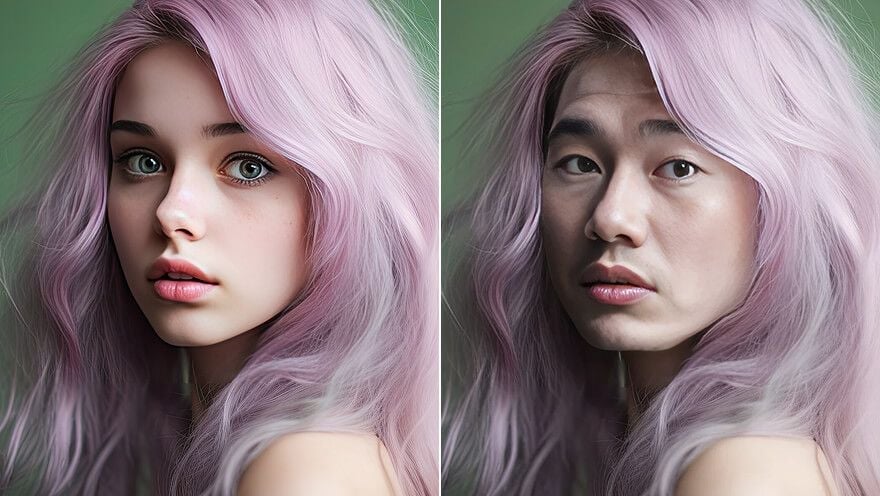
 BeforeAfterExample
Upload a target photo and a face reference to start.
Free AI Face Swap Online
Create a realistic photo face swap with Gemini Omni Flash. Upload the photo you want to edit, add a face reference, and blend the new face into the original lighting, pose, and expression.
Swap a faceRealistic AI face swaps for photos
Gemini Omni Flash focuses on believable photo edits, matching the replacement face to the target image so the swap feels natural instead of pasted on.
- Blend skin tone, angle, and lighting into the target photo
- Preserve the original pose, framing, and background
- Generate a clean AI face swap for portraits and creative edits
 BeforeAfter
Portrait face swap
new identity with matched lighting
Swap a face into portraits, posters, and scenes
Use the face swap tool for profile photos, group pictures, poster concepts, social graphics, and playful edits where the rest of the image should stay in place.
- Upload a target photo and a separate face image
- Keep the target hair or use the new face reference when needed
- Works best with clear, front-facing face references
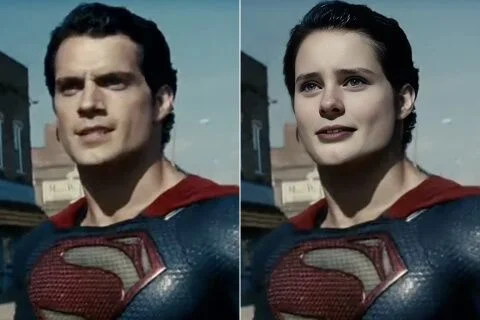 BeforeAfter
Character scene
place a face into a styled image
Built for photo face swap workflows
This page is tuned for image face swap tasks. It keeps the workflow simple, while video face swap and GIF face swap searches are addressed honestly in the FAQ.
- Optimized for high-quality photo face swap output
- Preview your setup before spending credits
- Download the final image when the swap is ready
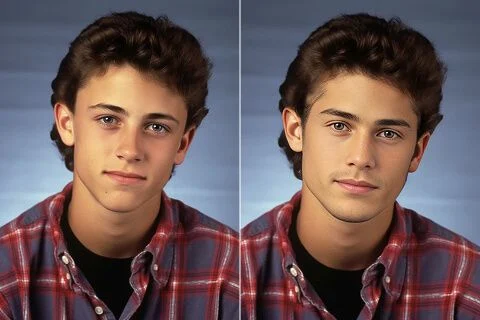 BeforeAfter
Everyday photo edit
clean swap for casual portraits
A controlled online face swap process
Review the uploaded images, generation cost, and finished result in one workspace so every swap is deliberate and easy to compare.
- Sample images help you test the flow quickly
- Clear upload slots for target photo and face image
- Generation state, result preview, and download in one place
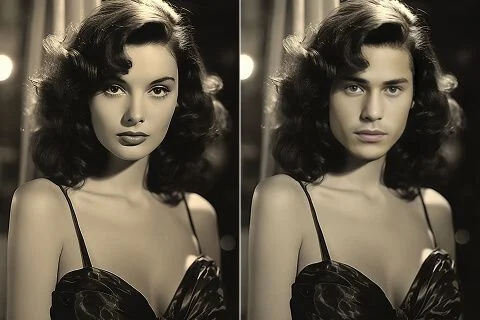 BeforeAfter
Vintage style image
blend faces into classic photo looks
Popular ways to use AI face swap
Face swap is useful for fast creative editing, social content, mockups, profile experiments, and visual jokes when you want a new face in an existing photo.
Meme and reaction images
Swap faces into familiar reaction formats or funny scenes, then download a clean result for social posts and group chats.
Social profile experiments
Try a different face reference in a portrait or scene before committing to a new avatar, thumbnail, or campaign image.
Group photo fixes
Use a better face reference when one person blinked or the expression did not land, while keeping the rest of the group photo intact.
Poster and character mockups
Place a face into a movie-style poster, costume concept, or character scene for quick creative direction and visual exploration.
Digital art references
Blend a face into concept art or illustrations to test identity, mood, and composition before refining the final piece.
Fun edits with friends
Create playful swaps from clear photos and compare results quickly, while avoiding sensitive or misleading use cases.
How to swap faces online
A good AI face swap starts with two clear images: the photo to edit and the face reference you want to blend in.
Upload the target photo
Choose the image that contains the face you want to replace. Portraits with clear lighting and visible facial features work best.
Add the face reference
Upload a clear face image, then select the hairstyle option that best matches your intended result.
Generate and download
Run the AI face swap, review the blended result, and download the final image when the match looks natural.
Why creators choose Gemini Omni Flash face swap
Creators use the tool for realistic photo swaps, fast mockups, and repeatable image edits without building a complex editing workflow.
Elena Ross
Social Editor
“The two-image workflow is clear. I can test a meme concept quickly and see whether the lighting match works before exporting.”
Miles Chen
Thumbnail Designer
“It is useful for fast poster mockups because the face blend keeps the scene and background stable.”
Sara Ahmed
Creative Producer
“The face swap preview helps our team compare options before we move a concept into heavier editing work.”
Noah Grant
Streamer
“I use it for reaction images and channel thumbnails when I need something funny but still clean enough to publish.”
Iris Park
Designer
“Being able to keep the target image structure while changing only the identity makes visual experiments much faster.”
Mateo Silva
Hobby Creator
“The sample images make the tool easy to understand, then I can upload my own photos when I am ready.”
AI Face Swap FAQ
What is an AI face swap?
An AI face swap replaces a face in one photo with a face from another image. The model tries to blend the new face into the original lighting, angle, expression, and scene so the result looks realistic.
How do I swap faces online with Gemini Omni Flash?
Upload the target photo, upload the face image you want to use, choose the hairstyle option, and run the generator. The workspace then shows the completed face swap for review and download.
Is this AI face swap free to try?
You can open the tool, try the sample images, and prepare the workflow for free. When you generate a result, the page shows the required credits before the swap runs.
Can I use face swap online with no sign up?
You can preview the page and set up the images before signing in. Actual generation may require sign-in so the app can manage credits, uploads, and your finished result.
What photos work best for realistic face swap?
Use clear face images with good lighting, visible facial features, and a similar angle to the target photo. Extreme blur, heavy shadows, or hidden faces can make the swap less natural.
Can I do video face swap or GIF face swap here?
This page currently focuses on photo face swap. If you need a video face swap or GIF face swap workflow, treat this page as the image version and use the video tools when that workflow is available.
Can I swap multiple faces at once?
The current workflow is designed around one target photo and one face reference. For group edits, run separate carefully reviewed swaps rather than assuming every face will change in one pass.
Is face swap safe for private photos?
Use the tool only with images you have permission to edit, and avoid sensitive identity documents or private material. Review the output before sharing it publicly.
More from Gemini Omni Flash
Create a cleaner AI face swap online
Upload a target photo and face reference, then generate a realistic face swap with Gemini Omni Flash in a focused photo-editing workflow.